Password Generator – Create Strong & Secure Passwords Online Free
Protecting your online accounts starts with using strong, unique passwords. Our Password Generator helps you instantly create secure passwords for websites, apps, Wi-Fi, and more. Instead of relying on easy-to-guess or repeated passwords, you can generate complex combinations that improve your security with just one click.
🔑 Password Generator
Generate a strong password for your online accounts, apps, and more.
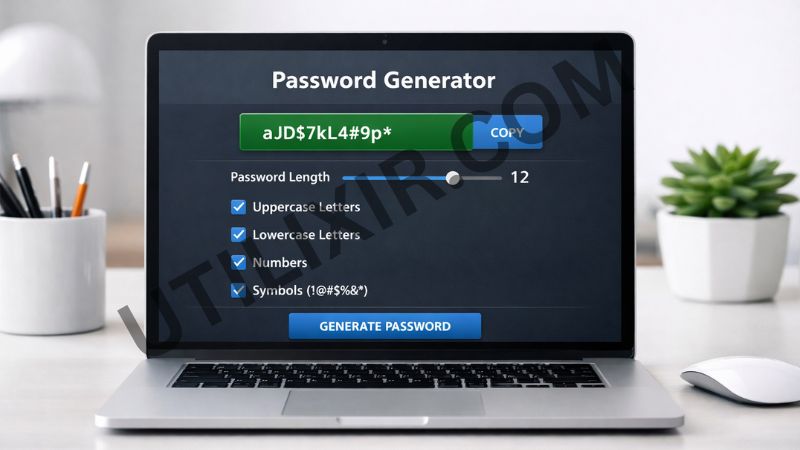
Weak passwords are one of the most common reasons for account breaches and unauthorized access. Using simple words, personal information, or the same password across multiple platforms makes your data vulnerable. With Utilixir’s Password Generator, you can create strong and random passwords that are much harder to guess or crack.
The tool is built for simplicity and flexibility. You can customize the length of your password and choose whether to include uppercase letters, lowercase letters, numbers, and symbols. There is no need to install any software or create an account. If you are managing multiple accounts or working with secure data, combining this tool with others like Online Text Editor, Digital Signature, and Note Encryptor can help support your broader digital workflow.
Key Features
1. Instant Password Generation - Generate strong, random passwords in seconds without any manual effort.
2. Customizable Password Options - Choose your preferred password length and include combinations of uppercase letters, lowercase letters, digits, and symbols.
3. Strong Security Standards - The generated passwords are designed to be complex and difficult to guess, helping improve account protection.
4. No Registration Required - You can use the tool immediately without signing up or providing personal information.
5. Free to Use - Password Generator is completely free, making it accessible for everyone.
6. Secure and Private - Passwords are generated directly in your browser and are not stored or shared.
7. Works Across All Devices - Use the tool on desktops, tablets, and smartphones with ease.
How to Use the Tool
Select your desired password length
Choose the character types (uppercase, lowercase, digits, symbols)
Click Generate Password
Copy the generated password using the copy button
Use the password for your account or application
Why Choose This Tool Over Other Tools
Many password generators either limit customization, require accounts, or are cluttered with ads and unnecessary features. Utilixir’s Password Generator focuses on simplicity, speed, and reliability. It allows you to generate strong passwords instantly without distractions or restrictions, making it suitable for both casual users and professionals.

Here is a quick comparison:
User Testimonials
Patrick A.
“I used to reuse passwords everywhere, but this tool helped me generate strong ones instantly. Very simple and useful.”
Annie K.
“The customization options are great. I can set exactly how strong I want my password to be.”
Ben S.
“No sign-up, no confusion. Just generate and copy. Perfect for quick use.”
Higgens R.
“I use this whenever I create new accounts. It gives me peace of mind knowing my passwords are strong.”
Conclusion
Utilixir’s Password Generator is a simple and reliable way to create strong, secure passwords for any purpose. It is fast, free, and works directly in your browser without requiring registration or installation. Whether you are protecting personal accounts, business tools, or network access, this tool helps you improve your security instantly. For better overall digital management, you can also use tools like Online Text Editor, Digital Signature, and Note Encryptor when working with encoded data alongside your secure workflows.
FAQs
1. Why should I use a strong password?
Strong passwords make it harder for attackers to guess or crack your account credentials.
2. Is this Password Generator free?
Yes, the tool is completely free to use.
3. Are generated passwords stored anywhere?
No, all passwords are generated in your browser and are not stored or shared.
4. Can I customize my password?
Yes, you can choose the length and include different character types.
5. Can I use this tool on mobile devices?
Yes, it works on smartphones, tablets, and desktops.
6. What is the ideal password length?
Longer passwords (12–16+ characters) are generally considered more secure.
7. Should I use the same password for multiple accounts?
No, it is recommended to use a unique password for each account.
8. Can I generate multiple passwords?
Yes, you can generate as many passwords as needed.
9. Who should use this tool?
Anyone who wants to improve their online security, including students, professionals, and general users.
10. Is this tool safe to use?
Yes, it is designed to generate passwords securely without storing any data.
Generate Your Secure Password Instantly
Try Utilixir’s Password Generator now and create strong, unique passwords for all your accounts in seconds.
Generate Password